How to Improve Google Ads Targeting
Below is an example of an ad that I would improve if I was working with this client. I see this as broken targeting due to misalignment between the search and the ad below.
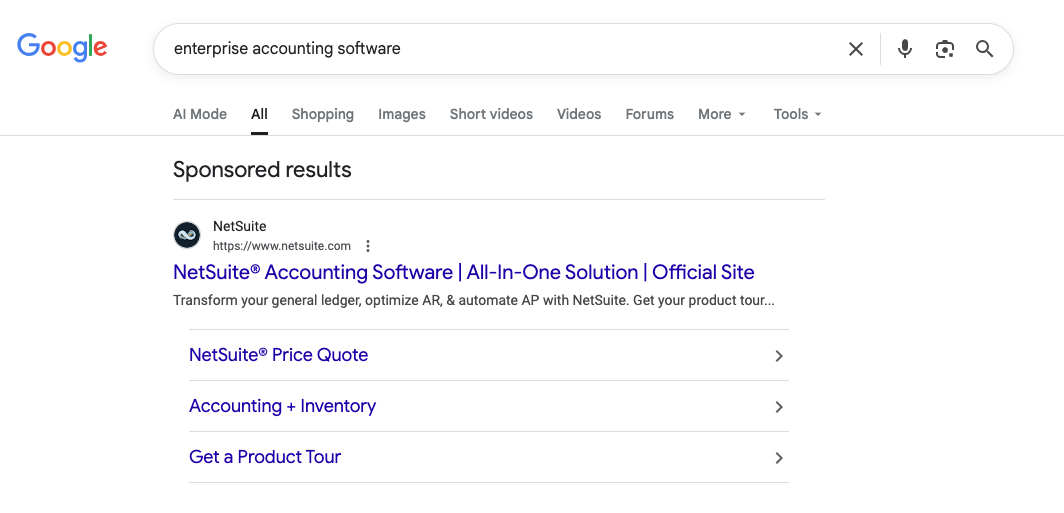
This is an example of a misaligned ad.
The ad example is for enterprise accounting software — a high-consideration, high-specificity purchase. But the copy reads like a generic billboard: “All-in-One Solution,” “Transform your general ledger,” “Get your product tour.” There’s no keyword confirmation. No audience filter. No signal that says “this is for enterprise buyers, not small businesses or curious clickers.”
A Client Example From My Work
A different client of mine sells education software for people who want to become professional tax preparers. Real coursework, real certification, a real career path. The ads were getting clicks. The leads coming in wanted to file their own taxes.
Same keyword universe, completely different person.
The course is for someone who wants to be a tax preparer, and the leads were from people who just wanted to not be one for an afternoon and do their own taxes. I see this exact shape of problem constantly, in accounts that look perfectly healthy when I just look at Google Ads.
Targeting Isn't a Setting. It's a Chain.
Well targeting isn’t just one setting in Google Ads.
The instinct, when leads feel wrong, is to go looking for a setting to fix.
Wrong audience. Wrong demographic. Wrong location radius. Wrong keyword. You turn a dial, watch the leads improve.
But if you ask why the wrong people are clicking in the first place, and the dial stops being the answer.
The real mechanism to target in Google Ads is a chain: keyword, then ad, then landing page, then the signal that gets sent back to Google.
One weak link anywhere in that chain, and Google fills the gap with noise, no audience setting will patch it, because the problem was never about who Google was allowed to show the ad to.
In the tax software account, the chain broke at the very first link.
The keywords were nouns, "tax preparation," "tax filing help," general enough to match both a person hunting for a career and a person hunting for a shortcut on their own 1040. Google didn't fail. It matched the keyword exactly as written. The keyword just never specified which of those two people it was supposed to find.
My advice is to think of Google Ads as a click-finding machine unless you force it to become a client-finding one. You can tell Google to optimize for leads. Unless you've told it, explicitly, at every link in the chain, what a good lead actually looks like, it will keep optimizing for the cheapest click that technically counts.
Stop Bidding on Nouns. Start Bidding on Problems.
This is where most accounts start. People choose keywords based on what they sell, not what the searcher is actually experiencing in that moment.
I struggle with this so much. I want to write for Google Ads Consultant or Google Ads Coach or Google Ads Second Opinion.
But people are searching, “why did my costs increase in Google”, “are there any good agencies” and what landed you on this post which would be how do I target in Google Ads or maybe “my targeting is broken”?
So for this client that I am talking about, "Tax preparation" is a noun. It says nothing about whether the person typing it wants a career or a refund. "Tax preparer certification course" is a problem. It can only mean one thing, and it can only attract one kind of person.
The fix for the tax software client wasn't a new audience or a bigger budget.
It was rewriting the keyword layer to ask a problem, not name a category, and writing ad copy that confirmed, directly, "this is for becoming a preparer," so anyone hoping for DIY tax help self-selected out before they ever clicked.
Your ad's job is not to convince everyone.
It's to make the wrong person not click. A good ad does exactly two things: it confirms the intent behind the keyword, so the right person feels seen, and it previews what's waiting on the landing page, so the click that does happen is aligned, not just curious. Google will always lean toward more clicks. Your ad has to lean toward better ones.
Your Landing Page Is a Targeting Tool, Not Just a Sales Page
A landing page isn't where a click lands. It's where Google learns who your real customers actually are.
For the tax software client, that meant the page itself had to reinforce what the keyword and ad had already filtered for, no soft, broad language that a DIY filer could still convince themselves applied to them.
Aligned signals do more for your targeting than a prettier design ever will.
A qualifying question on the form, something only a serious aspiring preparer would bother answering, sends Google a sharper message than any audience setting could: find me more people like this one, not more people who clicked like this one.
Without that closed loop, the signal Google actually gets is "cheap click," and cheap click is exactly what it will keep finding for you and if you are running in Performance Max that particular campaign type amplifies this mismatch.
The Challenge
Pull your search terms report this week and read it like a stranger would. Not "are these relevant," but "could a completely different kind of person have typed this and meant something else entirely." That's the blind spot. It's almost impossible to see in your own account, because you already know what you meant by the keyword. Google doesn't. It only knows what you told it, which is usually less specific than you think.
The Bottom Line
A high Optimization Score and a clean-looking Google Ads account don't mean your targeting is working.
They mean Google found clicks that technically satisfy what you asked for. If what you asked for was a noun instead of a problem, you'll keep getting exactly the kind of qualified-looking junk that doesn't show up as broken until you check your CRM and wonder where the revenue went.
If you want a second pair of eyes on where your own alignment chain is leaking reach out to me and I am happy to help.
