Google Maps Just Got Pulled Out of the Black Box. Here's Why That's Not Cosmetic.
I have a rule I don't break often: if I don't have a client running something, I don't write about it. The internet has enough recycled "Google just announced" posts written by people who've never opened the account they're describing. I didn't want to be one more.
This one's different, because I already broke my own rule before I wrote a word of this post.
A local therapy practice I coach asked me to test something new inside Demand Gen, and the test was the reason I'm writing this at all, not the announcement.
The Real Change Isn't a New Feature. It's a New Hierarchy.
The surface-level story, the one most of the recap posts are running with, is a feature list: Maps is now a selectable placement inside Demand Gen, you can run Maps-only campaigns, creative is visual-first, budget and radius are controllable. All true. All beside the point.
Here's the bedrock truth underneath it: Google just admitted that proximity-based intent is not the same category of signal as everything else it's been bundling into automation.
For years, Maps lived inside Performance Max, mixed in with Display, YouTube, and Gmail, decided by an algorithm optimizing for scale.
A solo therapist's office and a global e-commerce store got run through the same campaign type as if a person three blocks away and a person scrolling YouTube on their couch were equivalent leads. They were never equivalent. Google just hadn't built a structure that admitted it.
Pulling Maps out and giving it its own channel toggle inside Demand Gen is Google saying, out loud, that the "last mile" of a customer's journey, the part where someone is already in motion, already nearby, already deciding where to walk into, deserves to be handled differently than a cold impression in an inbox.
When Google restructures something instead of just adding a setting, that's a signal about where they think the money actually is, not a UI update.
For the therapy practice I work with, that meant something concrete: instead of letting Maps ride along inside a broader Demand Gen test, we stripped everything else away.
No YouTube, no Discover, no Gmail. Just Maps, a real photo of the actual office, and a tight radius.
The bet wasn't that Maps would suddenly perform better. It was that isolating the signal would let us actually see whether it performed at all, instead of it getting credit or blame for whatever the rest of the campaign was doing.
What This Means If You're Not a Therapist Either
This is the same discipline I push in every account, regardless of industry: a signal you can't isolate is a signal you can't fully trust.
Maps living inside PMax wasn't just a missed opportunity, it was a measurement problem.
You couldn't know if your local visibility was actually working, because it was never tested alone.
| Feature | Performance Max (PMax) | Demand Gen (2026 Update) |
|---|---|---|
| Control Level | Automated / AI-Driven "Black Box" | Modular / Manual Toggle Control |
| Placement Choices | All Google Properties (Automated) | Channel Specific (Maps, YouTube, etc.) |
| Creative Focus | Dynamic Asset Mixing | Visual-First / Narrative Imagery |
| Maps Strategy | "Maybe" (Hidden in Store Goals) | Direct "Maps-Only" Campaigns |
| Best For | Scaling Conversions (Bottom Funnel) | Local Discovery & Intent (Mid-Funnel) |
Before you touch this toggle, the question isn't "is Maps-only good." It's whether proximity is actually a meaningful part of how your specific customers decide to walk in.
A plumber, a cafe, a therapist's office, all of these live or die on someone nearby choosing them in the moment.
A national e-commerce brand doesn't have a "last mile" in the same sense, and forcing this test onto an account where proximity isn't the deciding factor will just produce noise dressed up as a strategy.
If you do have that kind of business, don't move your Search budget to fund this.
Carve out a small test, somewhere in the range of 10 to 20 percent of total spend, and let it run a real sample before you draw a conclusion.
The same rule that governs every other part of your account applies here: a week of data and a gut feeling are not a verdict, they're noise wearing a costume.
Give a Maps-only test a minimum of seven days before you touch it, and don't let an opinion about it form before the sample does.
The Challenge
The next time Google ships something that gets framed as "exciting new automation," ask the question that actually matters: did they just add a feature, or did they just admit something about how they were quietly grouping you before.
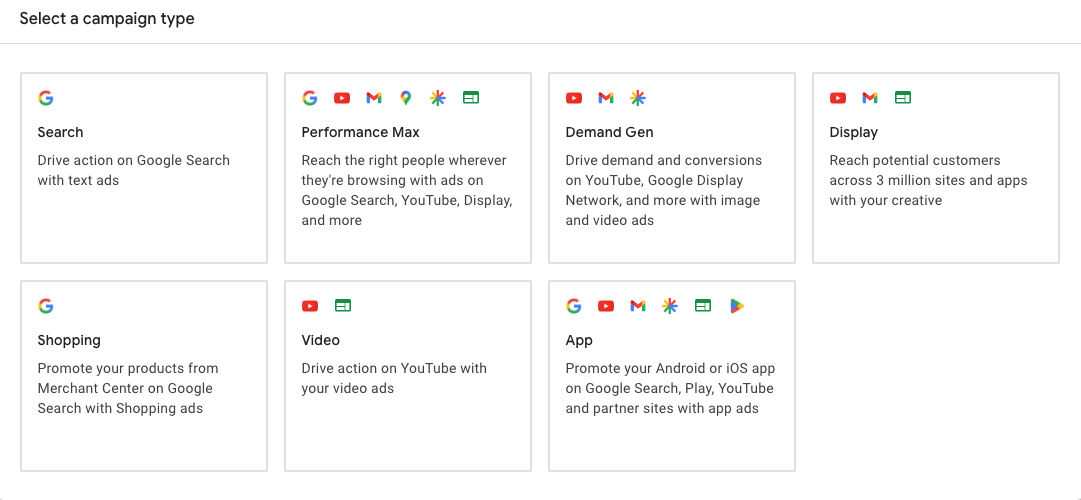
The Google Ads Campaign Dashboard Visual: Choosing a campaign type
This Maps change is the second kind. It's worth your attention specifically because it's Google conceding that your local customer was never the same kind of lead as everyone else stuffed into the same black box. Most updates aren't that honest. This one is.
The Bottom Line
Google rarely makes a structural change for cosmetic reasons. When proximity gets its own lane instead of getting buried in automation, that's not a feature drop, it's an admission about how badly proximity was being undervalued before. I wrote about this one because a real client tested it, not because a press release told me to. That's the only reason any of this is worth your time
If you want help figuring out whether your business actually has the kind of "last mile" proximity advantage worth testing.
