How Much Should I Spend on Google Ads? A Clear, Math‑Driven Budget Guide
A Clear, Compassionate, Math‑Driven Guide To Finding Your Minimum Viable Google Ads Budget
Last week I met with someone on Google Meets who was trying to figure out their Google Ads budget, and they looked…tired.
My Google Ads coaching client, like many a business owner, was not confused, not clueless, rather just overwhelmed by the sheer amount of conflicting advice out there about how to spend money wisely on Google Ads.
Then they asked the question almost everyone asks at some point:
“How much should I actually be spending on ads in Google?”
It’s a completely fair question.
And honestly, it’s one you should be asking and figuring out BEFORE you spend money running ads.
So instead of guessing or relying on “industry averages,” I walked them through the math — gently, step by step — because once you see the numbers, everything gets clearer and a lot less stressful.
This is the same math I’ve used with clients since 2017, and it still works in 2026.
Let’s walk through it together, in today’s blog post.
Also if you want to review all my budgeting posts I created a hub page where I break everything down. This page will be a guide that grows with the blog so feel free to book mark it: The Google Ads Cost & Minimum Budget Hub
Factors Influencing Your Google Ads Spend
When you’re setting your Google Ads budget, it’s not just about picking a number and hoping for the best. Several key factors shape how much you’ll need to spend on Google Ads to see meaningful results from your ad campaigns.
1. Industry and Competition Some industries are simply more competitive than others, which means higher average cost per click (CPC) and a bigger ad spend to stay visible. For example, legal, finance, and home services and therapy often have higher CPCs than niche or local businesses. Researching industry benchmarks and using Google’s Keyword Planner can help you estimate what other advertisers are paying for relevant keywords in your space.
When I am coaching my clients and working on getting things set up I do this work on a call together.
2. Your Marketing Goals Are you aiming to generate brand awareness, drive targeted traffic, or get direct sales? The type of Google Ads campaigns you run, whether search ads, display campaigns, or shopping campaigns will influence your ideal Google Ads budget. More ambitious goals or broader reach typically require a higher budget, while a focused campaign targeting long tail keywords or a local audience may allow for a smaller, more efficient spend.
Here is another great post for getting started: Is $20 a Day Enough for Google Ads? The Truth About Small Budgets
3. Target Audience and Geographic Reach The size and specificity of your target audience in Google Ads matter. If you’re a local business targeting a small area, your monthly budget can be lower than a national or international campaign. Expanding your reach to more locations or broader demographics will increase your required ad spend.
4. Keyword Selection and Match Types The keywords you choose, especially competitive or high-intent keywords, can drive up your Google Ads spend. Using a mix of broad, phrase, and exact match types, along with negative keywords, helps control costs and ensures your advertising dollars are spent on the most relevant searches.
I wrote two detailed posts about this topic of itent and match types for more reading:
Stop Blaming Google: How to Solve Your "Rising Costs" with a Cost-Intent Strategy
Stop Wasting Your Budget: How to Master Google Ads Match Types for Immediate ROI
5. Ad Quality and Landing Page Experience Google rewards high-quality ads and landing pages with better Quality Scores, which can lower your average CPC and stretch your budget further. Investing in strong ad copy, relevant keywords, and a fast, user-friendly landing page can make your ad budget go further by improving conversion rates and campaign performance.
6. Seasonality and Sales Cycle Some businesses see spikes in demand during certain times of the year. If your industry is seasonal, you may need to adjust your monthly spending limit to capture more traffic during peak periods. Similarly, a longer sales cycle may require a higher ongoing ad budget to nurture leads over time.
7. Historical Performance Data If you’ve run Google Ads before, your past campaign performance can offer valuable insights. Reviewing your Google Ads budget report, conversion tracking, and performance data helps you set a realistic starting budget and identify areas where you can optimize or scale your ad spend.
By considering these key factors, you can build a Google Ads budget that’s tailored to your business, your goals, and your market, giving you the best chance to generate meaningful conversions and grow profitably.
Step 1: Find Your Breakeven CPA (Your True North)
Most people set a budget based on what feels reasonable. But Google Ads doesn’t run on feelings — it runs on math.
Here’s the simplest place to start:
Example
Product price: $100
Cost of goods (COGS): $40
Gross profit: $60
If you spend $60 to get a customer, you break even. You don’t lose money, but you don’t make any either.
That $60 is your Breakeven CPA.
It’s important to also consider your profit margin here, comparing your cost per conversion and return on ad spend to your profit margin helps determine if your advertising expenses are truly justified and sustainable.
This number matters because it tells you the maximum you can pay for a conversion before your ads start hurting your business instead of helping it.
Most people feel relieved when they see this number because it finally gives them a concrete, defensible basis for determining how much to invest in Google Ads and what budget is actually required to hit their advertising goals.
Step 2: Calculate Your Actual CPA (What Google Ads Is Really Charging You)
Now let’s layer in your Google Ads performance.
Say:
Your average CPC = $5
Your website converts at 5% (which is close to the average conversion rate for many industries, check your sector’s benchmark to set realistic expectations)
Here’s the math:
20 clicks × $5 = $100 per conversion
Why 20 clicks? Because at a 5% conversion rate, only 1 out of 20 visitors becomes a lead or customer.
So your Actual CPA = $100.
When forecasting or comparing CPA, use your estimated conversion rate to plan your budget and predict how much you’ll need to spend to reach your goals.
Before committing to a larger budget, it’s smart to run test ads to gather real data on your actual conversion rate and optimize your campaigns.
Now compare the two:
Breakeven CPA: $60
Actual CPA: $100
This is where my Google Ads Coaching clients usually exhale and say, “Oh… that explains a lot.”
And it does. It’s not that Google Ads “doesn’t work.” It’s that the math isn’t lining up yet — and that’s fixable.
Step 3: Understand Google’s Minimum Data Needs (Your Budget Floor)
Here’s the part I feel like Google Ads experts like myself scream about on LinkedIn all day and my coaching clients don’t necessarily know until we talk…
Google needs enough data to learn who your buyers are.
If your target CPA is $50 but you’re spending $20/day, Google simply doesn’t have enough conversions to understand what “success” looks like.
This isn’t a moral failing. It’s not you doing anything wrong. It’s just how the system works.
If you want the full breakdown, I have a post on the 100‑click rule — but here’s the short version:
No data = no learning = no performance.
This is why I help clients set a minimum viable budget — a floor that keeps the algorithm stable.
Example
If you want:
30 conversions/month
CPA target = $50
Then your minimum budget is:
30 × $50 = $1,500 per month
This monthly spend is the minimum required for Google to gather enough conversion data. To set your average daily budget (or daily budget), divide your monthly spend by 30.4, which in this case is about $49/day.
Anything below that makes Google guess. And guessing is super duper expensive in Google Ads.
Step 4: The Reality of Scaling Google Ads (Diminishing Returns)
On the other end of the spectrum, some people say:
“Okay, I get it. Let’s spend $100k tomorrow.”
And I love the enthusiasm, but here’s the truth:
Google Ads doesn’t scale in a straight line. It scales in a curve.
When you first start spending, you’re buying the highest‑intent traffic — the people closest to buying. That’s where your ROI is strongest.
But as you increase spend, Google has to reach further into colder audiences.
Most businesses underfund their discovery campaigns because last‑click attribution hides the early touchpoints that actually create demand. I explain this pattern in my Last‑Click Attribution Illusion post.
What scaling actually looks like:
$5k spend: 100 leads at $50 each
$10k spend: ~160 leads at $75 each
$50k spend: CPA jumps to $150 because you’ve exhausted the high‑intent pool
For a medium sized business, typical Google Ads budgets often range from $5k to $50k per month, depending on goals and industry.
As you scale, it’s important to continually optimize your approach by evaluating different bidding strategies. This includes testing manual, enhanced, or automated options like smart bidding, which uses AI to adjust bids in real time and maximize conversions or conversion value based on your campaign objectives.
This isn’t failure. This is just how demand curves work.
If you have a smaller budget, you need to be especially careful about scaling, as diminishing returns can set in quickly and impact your overall cost-effectiveness.
In coaching calls, I help clients find their inflection point — the place where spending more stops being helpful and starts being wasteful.
Note: Most small budgets aren't failing because of the dollar amount, but because of a messy setup or they aren’t even sure what they need to get started. If you’re just starting out, and questioning everything here is a basic post: How to Buy Google Ads: A Complete Guide to Getting Started with Paid Search
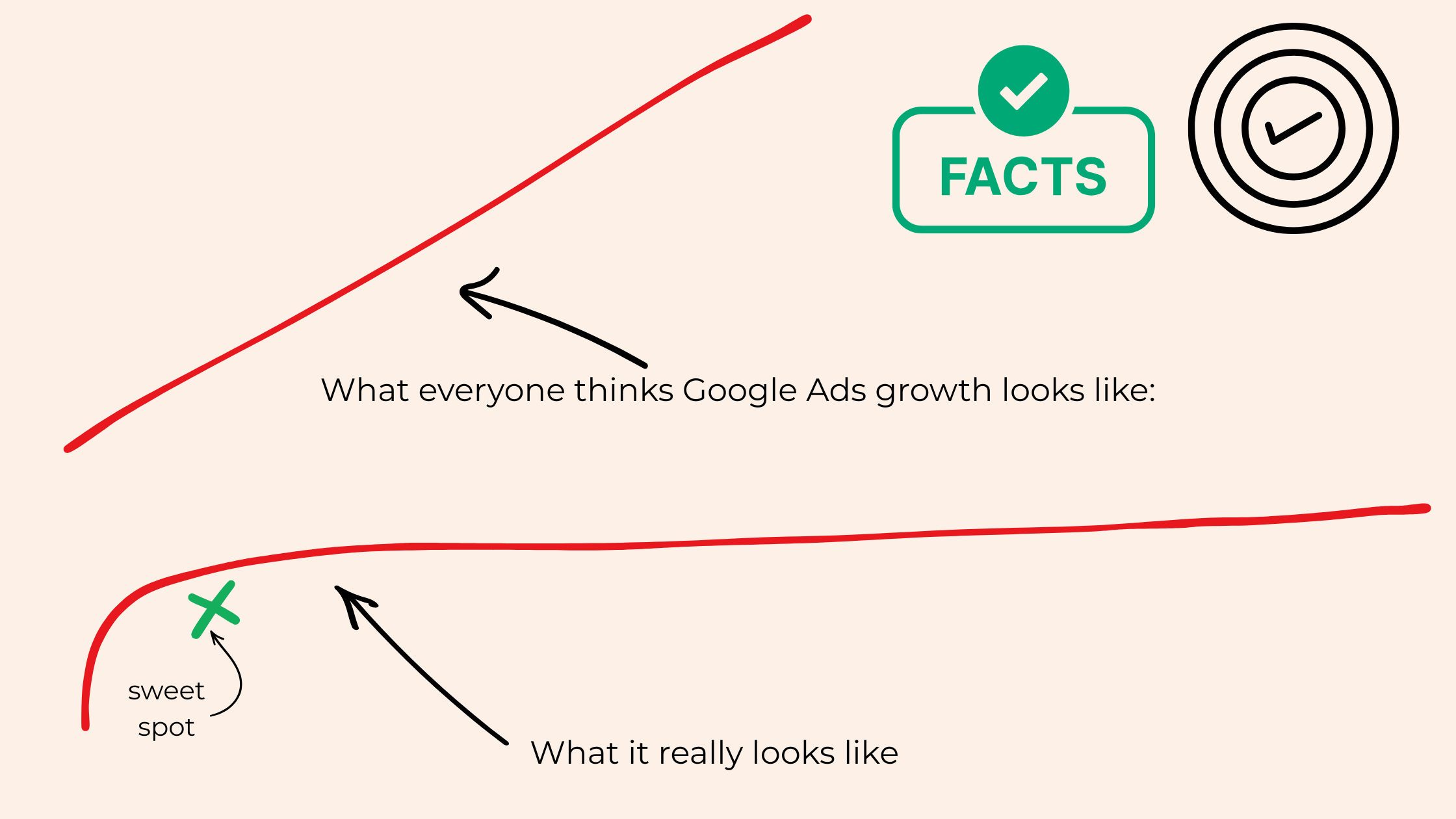
Two red line graphs comparing perceived vs actual Google Ads growth. Top graph shows steep linear growth labeled ‘What everyone thinks Google Ads growth looks like.’ Bottom graph shows a curve that flattens, labeled ‘What it really looks like,’ with a green ‘sweet spot’ marked early in the curve.
Visualizing the Growth Curve
If you're more of a visual learner, here's a simple diagram I use in coaching sessions to explain how Google Ads growth actually works.
The top line shows what most people think happens — a straight climb with every dollar spent.
The bottom curve shows what really happens — fast early growth, then a plateau as you reach colder audiences.
The green “X” marks your sweet spot — the point where your spend is still efficient and profitable.
This visual helps clients understand why scaling too fast can backfire, and why finding your inflection point matters.
Why So Many People Think Google Ads “Doesn’t Work”
Because doing this math is uncomfortable.
It forces you to look at:
Your margins
Your conversion rate
The quality of leads you are generating (not just the quantity)
Your landing page
Your offer
Your industry’s CPCs
For example, if you run an online store, paying attention to these metrics is crucial for ensuring your ad spend is driving profitable sales.
And sometimes the numbers reveal that something upstream that feeds your ads needs attention.
When reviewing performance, always check your Google Ads account for insights and troubleshooting opportunities.
That’s not a reason to feel discouraged. It’s a reason to feel empowered — because now you know exactly where to focus.
The Takeaway From This Budgeting Exercise
You’re not supposed to know this off the top of your head. You’re not supposed to magically guess the right budget. You’re not supposed to “just know” what Google Ads needs.
You’re running a business. You’re juggling a lot. And this math is genuinely confusing until someone walks you through it.
So here’s the simplest way to ground yourself:
Find your Breakeven CPA
Calculate your Actual CPA
Set a budget that gives Google enough data to learn
Fix your conversion rate before increasing spend
Because no matter how much you spend, you can’t outspend a math problem.
FAQ: Google Ads Budgeting
-
Start with two numbers:
Your breakeven CPA (how much you can afford to pay for a customer)
Your actual CPA (what Google is currently charging you)
Then set a budget that gives Google enough conversions each month to learn. A simple formula is:
Minimum Monthly Budget=Target CPA×Desired Monthly Conversions
If your target CPA is $50 and you want 30 conversions, your minimum budget is $1,500/month.
-
Your breakeven CPA is the maximum amount you can spend to acquire a customer without losing money. It’s calculated by subtracting your cost of goods (COGS) from your product or service price.
Example:
Price: $100
COGS: $40
Gross profit: $60
Your breakeven CPA = $60.
-
Most accounts need 20–30 conversions per month to stay stable. A good starting point is:
Monthly Budget=Target CPA×20–30
If your target CPA is $50, that’s $1,000–$1,500/month.
-
Your minimum budget depends on your CPC and conversion rate, but generally you need enough budget to generate:
At least 100 clicks per month, or
20–30 conversions per month
If your CPC is $5, then 100 clicks = $500/month. If your target CPA is $50, then 20 conversions = $1,000/month.
Your true minimum is whichever number is higher.
-
Google’s bidding system learns by observing patterns in who converts. If you don’t give it enough conversions or clicks, it can’t identify your ideal customer — which leads to unstable or expensive performance.
No data = no learning. No learning = no performance.
Consistent conversion volume keeps the algorithm stable and helps Google find more of the right people.
