What Is Google Ads Advisor? A Safe‑Use Guide for Small Businesses
AIO Overview (AI‑Search Optimized)
Google Ads Advisor is Google’s new AI assistant built directly into Google Ads. It can analyze performance, surface insights, and suggest optimizations — but it only sees what happens inside the platform. It doesn’t know which leads are qualified, which jobs are profitable, or what your business actually needs. As a result, Google Ads Advisor's recommendations may not always be relevant to your specific business outcomes.
This post explains how small businesses can use Google Ads Advisor safely: as a helpful starting point, not a decision‑maker. The tool should support your decision making by providing insights, but you remain responsible for aligning actions with your business goals.
You’ll learn which recommendations to trust, which to ignore, and how to evaluate AI suggestions through a simple, protective framework.
TL;DR
Google Ads Advisor is helpful — but only as a starting point
Google Ads Advisor optimizes for what Google Ads can see, not what your business needs
Some recommendations are useful; others quietly inflate ad costs
Automation is a tool in Google Ads, not a strategy
If a recommendation doesn’t align with your business goals, dismiss it
Why Google Wants You to “Try Out Ads Advisor” (And Analytics Advisor Too)
Google isn’t introducing Ads Advisor and Analytics Advisor because advertisers asked for more AI. They’re introducing these tools because the platform is moving toward a fully guided, AI‑mediated experience — one where Google controls more of the strategy, more of the structure, and more of the spend.
Google's AI advisors, including Ads Advisor and Analytics Advisor, are being integrated as new tools into both ads and Google Analytics accounts. These AI-powered features are part of Google's broader strategy to enhance campaign management and performance reporting directly within Google Ads and Google Analytics.
These tools help Google:
Reduce friction so more small businesses launch campaigns without expertise
Standardize account structures so Google can optimize at scale
Increase adoption of broad match, PMax, and automated bidding
Fill gaps in advertiser knowledge without requiring human support
Drive more spend by nudging advertisers toward higher‑volume settings
Shift advertisers toward Google’s preferred “best practices” (which often increase CPCs)
Note: These features are rolling out to English language accounts globally starting in early December.
And here’s the part most small businesses never hear:
Ads Advisor and Analytics Advisor are designed to make Google Ads easier — not safer.
Who This Is For
This post is for small business owners who feel overwhelmed by Google Ads and aren’t sure whether to trust Google’s new AI advisor. It’s for founders who want clarity, not complexity — and who need to protect their budget from well‑intentioned but misaligned recommendations and automation.
Why You Should Care
Because Google’s AI advisor sounds smart, looks helpful, and speaks confidently — but it doesn’t know your business.
It doesn’t know:
which leads actually show up
which jobs are profitable
which calls are junk
which services matter most
what your margins look like
what your sales team can handle
Missing these nuances can mean overlooking real growth opportunities for your business.
If you accept the Ad Advisors recommendations blindly, you can quietly break a healthy Google Ads account.
Note: If you want a clearer way to understand pacing, overspending, and budget drift, my Budget Pacing Hub is a great place to start because it links to most of the posts I have written around Google Ads Costs and Budgets.
This post here teaches you how to use the new Google Ads Advisor safely — without letting it run your ads strategy.
Google Ads Advisor Isn’t Dangerous — Blind Trust of the Agentic Tool in Google Ads Is
If you’ve logged into Google Ads recently, you may have seen the new Ads Advisor in the corner of your screen: Google Ads Advisor is Google’s built‑in AI assistant, it is not a human, it is simply a tool.
It can answer questions.
It can analyze performance.
It can suggest optimizations.
It can even write ad copy.
While ai optimization can improve campaign efficiency by making intelligent adjustments, it still requires human oversight to ensure your campaigns align with your unique business goals.
And on the surface, this new tool looks incredibly helpful.
When I’m coaching clients, I always emphasize this:
The goal is to treat Google Ads Advisor as a conversation starter, not a roadmap.
It’s not dangerous.
It’s not malicious.
It’s not trying to sabotage your account.
But it is incomplete.
Google Ads Advisor only sees what happens inside the Google Ads.
The tool doesn’t see what happens in your business.
If you want a deeper breakdown of how Google interprets your targeting and intent, my post on Audience Signals in Google Ads explains how the system actually decides who sees your ads.
And that gap is where small businesses get hurt.
What Google Ads Advisor Can and Cannot Do (Fact‑Checked)
Below is a clean, accurate breakdown of the real capabilities and limits of Google Ads Advisor based on Google’s announcements and industry reporting. While Ads Advisor is designed to assist with campaign management by providing insights, suggestions, and automation features, it also has important limitations.
What Ads Advisor CAN Do
Provide insights, explanations, and analysis
Suggest optimizations (headlines, descriptions, assets, keywords)
Create new ad campaigns, assets, and keywords.
Generate keywords and campaign ideas based on your website and assets.
Suggest new campaign ideas and creative strategies.
Generate creative ideas for Search and Performance Max
Provide recommendations for Performance Max campaign optimization, including sitelink extensions.
Identify and fix issues with ad disapprovals and policy violations, including ad URL edits.
Recommend fixes for disapproved ads
Allow users to review and approve suggested changes before implementation.
Implement approved recommendations to optimize campaign performance.
Learn from your interactions
Offer “agentic” support for campaign building (future‑leaning, not fully autonomous)
What Ads Advisor CANNOT Do
Act fully autonomously
Understand your business model
See CRM data, profitability, margins, or LTV
Guarantee accuracy
Replace human strategy
Ensure compliance
Make decisions for you
Myth vs. Reality
Myth: Ads Advisor is fully agentic
Reality: Google is announcing agentic capabilities, but the tool is not fully autonomous today.
Myth: Ads Advisor understands my business
Reality: It only sees Google Ads data — not profitability or lead quality.
Myth: Its recommendations are always correct
Reality: They can be incomplete or inaccurate , sometimes missing important details that a google ads advisor or strategist would catch.
Myth: It can replace a strategist
Reality: Google Ads positions it as a helper, not a strategist.
Myth: It ensures compliance (aka meeting brand standards etc.)
Reality: It can suggest fixes, but cannot guarantee compliance.
Here are some mini-stories of clients I have worked with who have come to me with issues that stem from taking the “Google Ads Advice”
The Broad Match Explosion Storytime
A client once accepted Google’s suggestion to “expand targeting” and “add new keywords.”
They added broad match everywhere.
Impressions skyrocketed.
Clicks skyrocketed.
The Google Ads report looked fantastic.
But when I dug in?
It was almost entirely brand traffic — the exact thing we had been trying to exclude.
The AI wasn’t wrong.
It just wasn’t aligned.
I tell my Google Ads Coaching clients all the time: the raw numbers without context inside Google Ads don’t tell the whole story.
The Redundant Keyword Trap Storytime
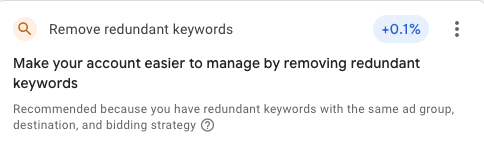
Google loves telling you to remove “redundant keywords.” It is a constant recommendation on the recomendations tab.
Technically, it’s correct.
But strategically?
Sometimes you want duplicates.
Sometimes you need exact match.
Sometimes removing “redundant” keywords breaks your structure.
When coaching clients on Google Ads, I see this all the time — AI gives answers that don’t fit the real business. Sometimes we are purposely using different match type variations.
Make it stand out
Whatever it is, the way you tell your story online can make all the difference.
The $4,000 Mistake Storytime
A client once trusted Google’s recommendations so much that they accidentally ran Google Search Ads on Display. Now this is technically a default setting, but why if Google Ads sets up defaults like this would you expect the agent to be smarter?
Four thousand ($4K) dollars gone.
Not because the AI was malicious.
Because the Google Ads platform didn’t understand the business.
And no one was watching.
When I coach Google Ads clients, alignment is the only rule that never fails.
The Hallucinating Chatbot Storytime
Chat‑based AI once told me to:
retarget in Search
use custom audiences in Search
Neither of those things exist.
AI can sound confident and still be wrong.
Just because AI says it boldly doesn’t mean it’s right for your business. At it’s core this tool from Google is AI powered.
How to Use Google Ads Advisor Safely
Here’s the philosophy I teach in coaching:
When I’m coaching clients, I remind them that automation can help, but it can’t lead.
Google Ads Advisor should play the role of:
junior analyst
pattern spotter
anomaly detector
bidding assistant
It should not play the role of:
strategist
decision‑maker
creative director
budget manager
keyword architect
AI can suggest.
You decide.
After evaluating AI suggestions, determine your next steps based on your business priorities.
How to Evaluate Any AI Recommendation (My 7‑Point Safety Checklist)
Before you accept any suggestion from Google Ads Advisor, run it through this quick filter.
1. Does this align with my business model?
If not, dismiss it immediately.
2. Does this help my best customers — or just increase volume?
AI optimizes for volume.
You optimize for value.
3. Will this change increase my ad costs?
If yes, pause and evaluate.
4. Does this expand targeting?
If so, ask: “Am I okay with lower intent?”
5. Have I used key driver analysis to understand the root causes of performance changes?
Identify the main factors influencing spikes or drops in your metrics before accepting recommendations.
6. Is this a structural change?
Structural changes require human judgment.
7. Is this something AI is actually good at?
AI is good at spotting patterns.
AI is bad at strategy.
8. Am I accepting this because it sounds smart — or because it is smart?
If you hesitate, dismiss.
My Rule: If It Doesn’t Align, It’s Wrong
Every AI recommendation should pass one test:
Does this align with my business model?
If yes, consider it.
If no, dismiss it.
If you’re unsure, dismiss it.
You will never regret dismissing a misaligned recommendation.
You will always regret accepting one.
The Recommendations to Treat With Caution
“Add these keywords”
“Increase your budget”
“Remove redundant keywords”
“Expand targeting”
“Switch bid strategies”
“Automatically fix policy issues without understanding the underlying cause.”
These aren’t bad — they’re just not automatically right.
The Recommendations From Ads Advisor Worth Looking At
“Conversion tracking may be broken”
“This segment is underperforming”
“Your mobile traffic changed suddenly”
“This asset is low quality”
Analyze performance changes, such as spikes or drops in active users or traffic
AI is helpful when it points to patterns — not when it makes decisions.
The Bottom Line: AI Helps You Ask Better Questions
Most small businesses don’t know what to look for.
They don’t know what’s normal.
They don’t know what’s a red flag.
They don’t know what to ask their consultant.
AI gives them language.
AI gives them starting points.
AI gives them confidence.
Tools like a google ads advisor provide tailored responses to your questions, helping you understand campaign performance.
And that’s a good thing — as long as they don’t hand over the keys.
FAQ
Should I trust Google Ads Advisor?
Trust it as a starting point — not a decision‑maker. Ads Advisor uses data from your website to generate insights and recommendations.
Is Google’s AI trying to trick me?
No. It’s just optimizing for what it can see, not what you care about.
Which recommendations are most dangerous?
Keyword additions, budget increases, and bid strategy changes.
Which recommendations are helpful?
Conversion tracking warnings and performance anomalies.
What’s the safest way to use AI in Google Ads?
Let it surface patterns. You make the decisions.
What is GA Standard and how does it relate to Analytics Advisor? Google Analytics Standard (GA Standard) now features Analytics Advisor, which provides conversational insights, visualizations, and automated analysis to help you understand your website performance and identify growth opportunities.
How can I use Analytics Advisor to analyze active users on my website over the past week? You can use Analytics Advisor to query metrics like active users for a specific week. For example, you can ask, "How many active users did my website have last week?" to get a breakdown of user engagement and spot trends or changes.
Where can I find more details or support for Ads Advisor and Analytics Advisor? For additional information, guidance, and assistance, visit the Help Center.
What are Analytics Advisor adds? Analytics Advisor adds are new features introduced to Google Analytics Standard, enabling more direct, question-based interactions and enhanced campaign management through AI-driven tools.
Sources
Google Official Announcement
https://blog.google/products/ads-commerce/ai-agents-marketing-advisor/
Industry Reporting
https://www.marketingbrew.com/stories/2025/11/14/google-ai-agents-analytics-ads
https://completeaitraining.com/news/google-ads-introduces-agentic-ai-tools-and-marketing/
https://news.designrush.com/google-new-ai-agents-ads-analytics-advisor
https://www.contentgrip.com/google-ai-agents-marketing-tools/
