How Long Does It Take for Google Ads to Work?
After 17 years running Google Ads campaigns and training the paid search industry, I can tell you the honest answer isn’t what most business owners want to hear. Yes, I could turn on your ads and get a lead notification tonight. But there’s a massive difference between buying a lead and buying profit.
Let me break down exactly what to expect and why the 90-Day Rule separates campaigns that flame out from those that generate leads for years.
I previously broke down the 8-12 week technical optimization window, but today I’m focusing on the business reality: The 90-Day Rule for Profitability.
TL;DR: When Do Google Ads Start Delivering Leads?
Here’s the direct answer: your google ads can start delivering clicks within 24–48 hours of launch. You might see your first leads within the first week or two. But getting leads at a cost your business can stomach long term typically takes about 90 days.
The distinction matters:
24–48 hours: Initial impressions and clicks appear in your google ads account
Days 1–14: The google ads learning phase begins, ad approvals occur, minimal conversions expected
Days 15–30: Early trends emerge, first optimization window opens
Days 31–60: Learning settles, cost per conversion begins improving
Days 61–90: True efficiency achieved, your cost per lead becomes predictable
90+ days: Long-term optimization and scaling mode
The first few weeks are volatile. That inconsistency isn’t a sign of failure—it’s exactly how google’s machine learning systems work. By month 3, you’ll have enough data to stop guessing and start scaling.
Knowledge is power in PPC. Respecting the 90-Day Rule is how you move from buying any lead to buying consistent profit.
Who This Timeline Applies To (And When It Doesn’t)
The 60–90 day window applies most directly to small and mid-sized service businesses launching new or significantly reworked google ads search campaigns.
This timeline is relevant if you’re:
A first-time advertiser with zero account history
Launching a new google ads campaign from scratch
Installing new conversion tracking or landing pages
Restructuring your ad groups or switching to smart bidding
A new agency taking over an underperforming account
Edge cases to consider:
Very low budgets ($10–20/day): Results take longer because you’re gathering data more slowly
High-budget competitive niches (legal, medical, finance): May need more time despite higher ad spend because filtering signal from noise takes longer
E-commerce with strong history: Can sometimes move faster if there’s years of clean, conversion-rich data
I have written extensively on this blog about budgets. Here are a few posts to explore if you want to learn about budgets in Google Ads.



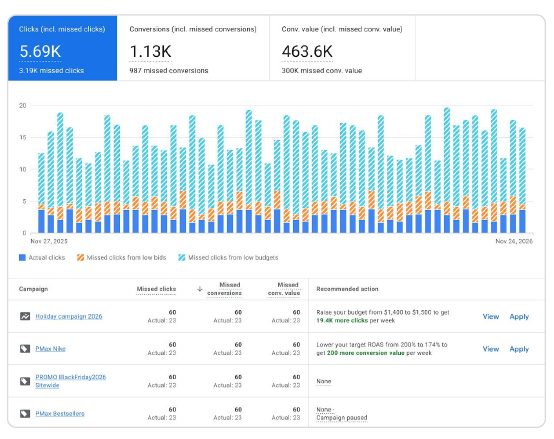





Major changes which include: new landing pages, new bidding strategy, significant keyword restructures will still trigger a learning period even in established accounts.
The 2026 Reality: Why AI Demands "Information Gain"
In 17 years of doing this, the biggest shift I’ve seen is the move from manual control to AI-driven Smart Bidding. In 2026, Google’s machine learning is incredibly powerful, but it’s also a "cold" engine at launch. It lacks Information Gain—the specific, proprietary data unique to your business and your local market.
If you are using Smart Bidding (Target CPA or Maximize Conversions), the 90-day window isn't just a suggestion; it’s a technical requirement. The AI spends the first 30–60 days "failing fast" to learn:
Which 20% of your search terms actually result in high-quality phone calls.
Which audience segments have the highest intent versus just "window shopping."
How to outbid your specific competitors for the most profitable clicks.
Without this Information Gain phase, the algorithm is just guessing with your credit card. You aren’t just waiting for the clock to tick; you are feeding a hungry AI engine the data it needs to eventually beat your competitors' historical performance.
How Google Ads Actually Works (So the Timeline Makes Sense)
Understanding the mechanics helps explain why patience pays off.
When someone types a search query, Google runs a real-time auction. Your ad’s position depends on:
Your bid amount
Ad relevance and quality score
Landing page experience
Ad extensions and formats
But here’s what matters for the timeline: google’s algorithm needs real-world data to figure out which users are most likely to click, convert, and ultimately buy.
The “buying data” concept: In Month 1, your early ad spend is essentially funding answers to what doesn’t work. You’re paying Google to tell you which keywords waste money, which audiences don’t convert, and which times of day are dead.
In 2026, the secret weapon in PPC isn't just your budget, it’s Information Gain. While your competitors are guessing which keywords work, you are paying for the hard data that proves what doesn't. Every 'wasted' click in Month 1 is actually an investment in proprietary intelligence that the algorithm uses to outmaneuver everyone else in your auction.
Modern google ads accounts using smart bidding (target CPA, target ROAS, maximize conversions) depend heavily on google’s ai to optimize bids. This amplifies the need for a proper learning period. Without sufficient data, the algorithm is guessing—which means higher costs and lower efficiency.
This isn’t waste. It’s the necessary cost of building a trustworthy data foundation.
Phase 1: Foundation & Data Buying (Days 1–30)
Month 1 is about building a trustworthy data set, not achieving your target cost per lead.
What’s happening technically:
Ad approvals occur within the first 24–48 hours
Your bidding strategy enters “learning” status
The search terms report begins populating with actual queries
Conversion tracking gets tested against real user behavior
Think of Month 1 as the Information Gain Phase. Google’s AI is a blank slate for your specific business. It needs to see 50-100 'bad' interactions to understand what a 'perfect' customer looks like. If you stop now, you’ve paid for the education but walked away before the graduation.
What to expect:
Higher cost per lead (the algorithm is casting a wide net)
Inconsistent daily performance—some days multiple leads, others none
Some wasted clicks on irrelevant queries
Volatility that looks concerning but is completely normal
By the end of Month 1, you should have:
Enough clicks to see patterns in search terms, locations, and devices
At least some early conversions confirming your tracking works
A populated search terms report revealing obvious waste to cut
Initial data to guide real optimization decisions
Frequent, heavy-handed changes (daily bid adjustments, budget cuts, constant keyword rewrites) reset the learning clock and extend this phase unnecessarily.
Week 1 Checklist: Get the Basics Right
Week 1 is about validation, not verdicts. Focus on confirming your technical setup, not judging campaign’s performance.
Essential checks:
Conversion tracking: Verify form submissions, phone calls, or purchases are recording correctly in your google ads account and google analytics
Search terms report: Review daily to add obviously irrelevant queries as negative keywords and prevent obvious waste
Ad approvals: Confirm all ads and extensions are approved and serving; fix any disapproved ads immediately
Landing pages: Ensure fast load times (especially mobile), message match to your ad copy, and a clear call to action
Important caveat: Any tracking or landing page fixes made in week 1 effectively reset your “real” start date for measuring performance. If you fix broken conversion tracking on day 5, your meaningful learning phase starts on day 5.
What Not to Do in the First 30 Days
Impatience in the early phases is the #1 reason campaigns fail. Here’s what to avoid:
Don’t judge success on 1–3 days of data. Look at 7–14 day windows before making directional decisions. If your ad results look inconsistent in Month 1, nothing is wrong—this is how the system works.
Don’t make daily bid changes or major budget swings. Each significant change pushes the campaign back into learning and delays your timeline.
Don’t turn campaigns off and on repeatedly. Sporadic ad delivery dramatically slows the time to working results.
Don’t cut your daily budget below what’s needed to gather data. If you can’t afford enough clicks to learn, you can’t afford to run google ads yet.
Don’t chase a target cost per lead the system hasn’t earned yet. Early CPAs of $75–100 that settle to $35–50 by Month 3 is normal trajectory, not failure.
The job in this phase: collect clean, consistent data. Period.
Phase 2: Refinement & Early Efficiency (Days 31–60)
Month 2 is the turning point. You shift from “what’s happening?” to “what should we keep, cut, and double down on?”
What should be visible by now:
500–1,000+ clicks accumulated (depending on budget and click costs)
Conversion patterns emerging across keywords, locations, and times
Learning status settling on your smart bidding strategies
Enough data to make confident optimization decisions
Key actions in this phase:
Pause high-spend, zero-conversion keywords and placements
Tighten match types based on your search terms report
Expand your negative keywords list to eliminate irrelevant queries
Shift budget toward proven search terms and audiences
Expected improvements:
Lead volume stabilizes
Lead quality improves as low-intent traffic gets carved away
Cost per conversion starts moving in the right direction
Google’s algorithm focuses on users who look more like past converters
This is where you transition from “buying data” to “shaping performance.”
Key Optimization Moves in Weeks 5–8
Here’s your practical optimization checklist for this phase:
Cut confident losers: Pause keywords with 80–100+ clicks and zero conversions. That’s enough data to make the call.
Test new ad copy: Create different ad variations that echo the language real searchers use in your search terms report. Use responsive search ads to let Google test combinations.
Refine targeting methods: Adjust location targeting, device bids, and time-of-day schedules based on where and when conversions actually occurred.
Adjust bidding gradually: Tweak your target CPA or target ROAS by small amounts rather than big swings that destabilize ads performance.
Improve landing page experience: If specific pages convert better, shift traffic there. Rebuild or pause underperformers.
Review your target audience: Are the right potential customers clicking? If not, adjust your thorough keyword research accordingly.
By week 8, many accounts start seeing cost per lead move in the right direction—even if it’s not yet at ideal long-term levels.
Phase 3: True Efficiency & Scaling (Days 61–90+)
Month 3 is where “Knowledge is Power” kicks in. You stop guessing and start scaling.
What’s different now:
Google’s algorithm has 2+ months of conversion history
The system understands which search queries, demographics, and devices produce valuable leads
Your cost per lead begins settling near a level your business can sustain
Ad’s effectiveness becomes predictable rather than volatile
How to use accumulated data:
Identify “hero” keywords (your top converters) and protect their budget
Find top-converting audiences and locations for expansion
Recognize highest-ROI devices and times for bid adjustments
Gather data on what’s working to inform future campaigns
Scaling guidelines:
Increase budgets gradually—10–20% at a time—to avoid shocking the system
Consider branching into Performance Max, the google display network, or YouTube remarketing once your search campaign is solid
Use your proven conversion data to inform smart bidding in new campaign types
By day 90, you aren’t just running google ads. You’ve built a predictable lead-generation machine.
How to Tell Your Google Ads Are “Working” by Month 3
Here’s how to know you’ve reached the efficiency phase:
Marketing metrics that indicate success:
A predictable range for cost per lead (e.g., $30–45 consistently)
Consistent weekly lead volume with fewer wild daily swings
Click through rate and conversion rate have stabilized
High intent keywords dominate spend while low-intent queries are filtered out
Business metrics that confirm quality:
Sales or intake teams report lead quality has improved, not just quantity
Your close rate on Google Ads leads is acceptable
Revenue per lead justifies your ad spend
ROI makes long term success achievable
What you should see in your data:
The search terms report shows focused, relevant queries
Your google ads performance trends are predictable
Optimize bids becomes fine-tuning rather than firefighting
Consistent performance week over week
If these boxes are checked, you can confidently say: “Yes, this is now working for us.”
What Makes Google Ads Take Longer (or Faster) to Work?
The 90-day guideline is typical, but numerous factors affect your specific timeline.
Factors that slow results:
| Factor | Why It Delays Results |
|---|---|
| Tiny budgets | Takes longer to accumulate statistically meaningful data relative to click costs. |
| Sporadic ad schedules | Gathering data only part-time extends the machine learning period. |
| Broken conversion tracking | Algorithms optimize based on compromised or missing data points. |
| Constant structural changes | Each major edit resets the "learning clock" for the campaign. |
| Highly competitive industries | There is significantly more market noise and bidder competition to filter through. |
Factors that speed results:
Strong existing brand demand (people searching your name directly)
Proven landing pages with established conversion rates
Accurate data and tracking from day one
Sufficient budget to hit 20–30+ clicks daily
Clear, differentiated offers that reduce messaging ambiguity
Industry variance: Legal, medical, and finance campaigns with high CPCs often need more time and budget. Local service businesses with moderate competition and clear geographic targeting may move faster.
How to Know If You Have a Google Ads Problem vs. Just Needing More Time
Not every struggling campaign just needs more time. Here’s how to tell the difference.
Red flags that signal a real problem:
After 60–90 days, almost no conversions and minimal qualified traffic
No conversion tracking installed, or tracking that’s broken
Irrelevant search terms eating the majority of your ad spend
Ongoing disapproved ads preventing delivery
Landing pages that don’t work on mobile or don’t match ad promises
Normal patterns that look like problems but aren’t:
Expensive early leads that gradually get cheaper over time
Modest but improving conversion rates
Inconsistent daily performance in the first few weeks
Initial data showing some wasted spend on irrelevant queries
Learning phase volatility in weeks 1–4
Checkpoint framework:
Campaign Maturity Timeline
| Checkpoint | Key Question |
|---|---|
| Day 14 | Is conversion tracking working and are ads serving? |
| Day 45 | Is the data showing patterns? Is optimization beginning? |
| Day 90 | Is cost per lead predictable and sustainable? |
If you’re hitting these milestones appropriately, you’re on track. If not, something fundamental may need expert intervention.
Regularly review your account against these checkpoints to separate natural learning from ongoing optimization problems.
Final Takeaways: Respect the 90-Day Rule if You Want Profitable Leads
The core truth: you can buy a lead quickly, but building a profitable, predictable lead-generation system with google ads to work sustainably takes about 90 days.
The three-phase summary:
Month 1: Buying data. Higher costs while learning what doesn’t work.
Month 2: Carving away waste. Pausing keywords, refining targeting, improving lead quality.
Month 3: Achieving efficiency. Predictable costs, scaling what works, building long term success.
The mindset shift:
If you optimize for “ASAP,” you end up with a high-cost flash in the pan. If you optimize for “Month 3 and beyond,” you build a lead-generation machine that stays profitable for years.
Optimizing your new google ads campaign isn’t a one-time switch you flip and forget. It’s an ongoing process of collecting data, testing, refining, and scaling. Realistic expectations plus informed patience is the fastest path to sustainable results.
Set your 90-day milestone. Build your foundation in Month 1. Refine aggressively in Month 2. And by Month 3, you’ll have the up to date data and proven performance to scale with confidence.
That’s how long does it take for google ads to deliver leads you can actually profit from.
Ultimately, the 90-Day Rule is about compounded Information Gain. By Month 3, your account has more 'intelligence' than a brand-new campaign ever could. That’s why you can’t shortcut this process, you can’t scale a campaign that hasn’t learned how to win yet.
