Mastering Google Ads Budget Pacing: Tips for Effective Spend Control
Introduction to Budget Pacing
Budget pacing is crucial for managing Google Ads campaigns effectively. It ensures your average daily budget is used in a way that actually supports your campaign goals. And let’s be honest, budget pacing is also the thing that keeps most advertisers and PPC managers awake at night. It isn’t always straightforward, and it’s definitely not something Google makes easy to understand.
If you want to understand the math of budget pacing I wrote a post here that is helpful: Google Ads Budget Pacing: How to Control Spend, Protect Profit, and Stop Google From Spending Your Budget Early
Understanding how budget pacing works helps you prevent overspending and underspending, which ultimately protects your performance and your return on investment (ROI). It also helps you communicate clearly with anyone who has a stake in your Google Ads results. When you understand pacing, you reduce your own anxiety because you finally know what to expect from the platform instead of feeling blindsided by it.
Up through 2026, Google had two ways to set a budget. The primary method most people are familiar with is the daily budget — but that daily number always rolls up into a monthly spending limit, and the math behind that can be incredibly confusing. I have an article that breaks down Why Your Google Ads Budget Explodes With Maximize Conversions (And How to Control It) that is helpful as well.
In 2026, Google also introduced a brand‑new option: Campaign Total Budget. This gives you a fixed spend amount for the entire campaign flight, which behaves very differently from daily budgets and has its own pacing rules. Here is a detailed post that will help you understand the new budgeting change in 2026 and what it means for you: The Architecture of Urgency: Decoding the Behavioral Motivations of Google Ads Campaign Total Budgets
All of that said, effective budget pacing requires realistic goals, consistent spend tracking, and proactive adjustments. When I’m coaching or consulting with clients an Google Ads, this is one of the first foundational skills I teach.
When you understand budget pacing, you become better at setting goals, better at interpreting what your Google Ads account is doing, and better at making long‑term decisions that actually support campaign performance. When you don’t understand pacing, everything else becomes a struggle — because you’re constantly reacting instead of leading.
Understanding budget pacing doesn’t just make you a better advertiser. It makes you more confident, more in control, and more comfortable inside the ad platform. And when I’m coaching, this is exactly the kind of clarity I guide you through.
Setting Up a Google Ads Budget
To set up a Google Ads budget, you first need to determine your monthly budget and choose a bidding strategy, such as cost‑per‑click (CPC) or cost‑per‑thousand impressions (CPM). I wrote a detailed guide about the numbers behind budget planning so you can set your account up optimally from the start: How Much Should You Actually Spend On Google Ads campaigns
Google Ads campaigns can be set with a daily budget, and the platform will automatically adjust your spend to ensure the monthly limit isn’t exceeded. However, and I cannot stress this enough, you still need to watch your campaigns throughout the month. The rules around daily vs. monthly spend are confusing, and if you don’t understand the nuances, Google’s “promise” not to overspend can be unintentionally broken, even by an experienced PPC manager.
It’s also essential to consider historical performance data and sales events when setting your budget so your campaigns are optimized for peak times. Understanding historical performance matters because Google can spend more than 2x your daily budget if it believes it can get a conversion. Knowing whether you’re set up for an overspend scenario is critical. I covered this concept in my post: Google Ads Budget Pacing: How to Control Spend, Protect Profit, and Stop Google From Spending Your Budget Early
You can also set up multiple campaigns with different budgets and bidding strategies to target specific audiences and achieve specific goals. In coaching, I often recommend structuring budgets around margins and business priorities. For example, when I worked in eCommerce, the main product line usually had its own campaign with a larger budget, while accessories or lower‑priced items had separate campaigns. This allowed us to control spend and grow sales for the higher‑value hero products without letting smaller items siphon budget away.
Budget Management Strategies
Effective budget management is less about manual tweaking and more about choosing the right framework for your goals. Here are three core strategies to consider:
Using Campaign Total Budgets
Building on the setup basics, one of the most effective ways to automate control is through Campaign Total Budgets. This new feature allows you to set a fixed amount for a specific flight, ranging from a few days to several weeks, without the need for daily manual adjustments. It is currently available for Search, Performance Max, and Shopping campaigns, ensuring your spend stays perfectly on track for a set goal.
However, as I detailed in The Architecture of Urgency: Decoding the Behavioral Motivations of Google Ads Campaign Total Budgets you must consider how your budget choice and targets impact ad serving. If your flight is too short or your budget too lean, Google’s internal pacing can prioritize speed over efficiency or serve another campaign that has a more fluid budget.
Strategic Use of Shared Budgets
While individual campaign budgets offer control, Shared Budgets allow you to pool funds across multiple campaigns. This is a strategy I often deploy when I want several campaigns to behave as a single unit, even if they must remain separate for structural reasons like sales territories or reporting requirements. The golden rule here is that the campaign goals must be identical; otherwise, the "hero" campaign in the group may cannibalize the budget of the others, much like the accessories/main line example mentioned earlier.
Smart Bidding: Target CPA & Target ROAS
Finally, to bridge the gap between budget and performance, Target CPA (Cost-per-Acquisition) and Target ROAS (Return-on-Ad-Spend) are your most powerful levers. These allow you to set a specific financial goal and let Google Ads optimize bids in real-time to meet it.
A word of caution, though: automated bidding acts as a "governor" on your account. If you set a target that is too restrictive, Google will throttle your spending to ensure it stays within your parameters.
Deep Dive: Not all smart bidding is the same. Learn exactly why Maximize Conversions vs. Maximize Conversion Value behave so differently when it comes to daily budget pacing.
This can lead to a sudden drop in volume, so always monitor your "Limited by Budget" or "Limited by Bid" statuses closely when these are active.
The platform will automatically adjust your spend to ensure the monthly limit isn’t exceeded. However, if you don’t understand the nuances you might get stuck. I have an article that breaks down Why Your Google Ads Budget Explodes With Maximize Conversions.
Ad Budget Optimization
Budget management isn't a "set it and forget it" task; it requires a systematic approach to optimization to ensure your spend stays aligned with performance. Here is the framework I use to scale accounts effectively:
The "Top-Down" Optimization Priority
When auditing or managing an account, I always start by sorting campaigns by total spend over a specific timeframe (usually 30 to 90 days). By focusing on your highest-spend areas first, you ensure that your optimizations have the largest possible impact on your overall ROI. If you can squeeze a 10% improvement out of your biggest campaign, it often outweighs a 50% improvement on a tiny experimental campaign.
Google Ads vs. Google Analytics: Know Your Source of Truth
While I recommend using Google Analytics to track broad conversion trends and user behavior, there is a critical distinction to make: For Google Ads optimization, the platform itself is your primary source of truth.
Google Analytics and Google Ads attribute conversions differently (e.g., click-through vs. view-through or different attribution windows). If you try to optimize your Ads budget based solely on GA data, you may inadvertently cut funding to campaigns that are driving significant value within the Ads ecosystem.
Holistic Diagnostic Checks
Budget optimization isn't just about moving sliders; it’s about diagnosing why a budget isn't performing. When an account isn't hitting its goals, I walk my coaching clients through a layered diagnostic process:
Ad Delivery: Are you losing impression share due to budget or rank?
Landing Page Experience: Is your budget being wasted on clicks that bounce because the page is slow or irrelevant?
Contextual Factors: Are external factors like seasonality or competitor bid hikes inflating your costs?
In my article: Profit on Ad Spend (POAS): Profit‑Driven Advertising: ROAS vs POAS for Real Growth I breakdown further the importance of being aligned on campaign goals and performance.
Compounding Growth
Ultimately, consistent optimization is what allows an account to scale. By trimming waste from underperforming areas and reinvesting it into "hero" campaigns, you create a cycle of improving ROI. Over time, this discipline is what transforms a modest budget into a high-growth engine.
By layering these insights, you can move beyond simple spending cuts and start making strategic adjustments that actually improve the health of the account.
Budget Pacing Techniques
In an industry obsessed with automation, the way you track your spending is often the difference between a profitable month and a budget disaster. While there are many ways to handle pacing, they generally fall into three categories:
1. Pacing Algorithms and Third-Party Tools
For managers handling massive scale, pacing algorithms which found in tools like Optmyzr or Shape.io can can help automate spend adjustments to ensure you hit your targets. These tools are excellent for high-volume accounts where manual tracking of every penny is more challenging.
2. The "Mind-Muscle Connection" of Spreadsheets
Personally, even after 17 years in the industry, I am a firm believer in the manual budget tracker. Whether it’s Excel or Google Sheets, there is a "mind-muscle connection" that happens when you manually input your data.
I come from the early days of PPC where overspending was a constant threat, and that "paranoia" has served me well. By manually updating a sheet, I am forced to see the daily fluctuations in impressions, clicks, conversions, and ROAS. This level of granular awareness allows me to spot a trend or an anomaly instantly and long before an automated tool might flag it.
3. The Danger of "Set and Forget"
This is exactly why I speak out about the current trend of account managers juggling too many accounts. When you are spread too thin, you lose that mental map of how an account is performing. On any given day, an expert manager should have the "pulse" of their account in their head.
Why Manual Tracking Wins for Growth:
Immediate Trend Spotting: You notice a CPC spike the day it happens, not a week later.
Contextual Adjustments: You know why the spend is up (like a flash sale or news event) in a way an algorithm might not.
Data-Driven Decisions: Every adjustment you make is rooted in the actual performance you just recorded.
Regardless of the tool you choose, the goal of pacing is simple: optimize your budget to improve ROI and ensure that your spend is fueling growth, not just disappearing into "accidental" overspends.
Business Goals and Budgeting
At the end of the day, a Google Ads budget isn't just a line item in your marketing spend; it’s a financial vehicle designed to reach your Objectives and Key Results (OKRs). If your budget and your business goals aren't speaking the same language, you’re essentially driving with one foot on the gas and the other on the brake. As an independent Google Ads Consultant and Google Ads Coach, I have been hired for budget pacing alone, simply because the task can be so critical to large brand and advertisers.
1. Let the Goal Dictate the Strategy
Your budget shouldn't be a random number pulled from thin air. It needs to be reverse-engineered from your primary goal.
If you’re hunting for Sales: Your budget and bidding strategy (like Target ROAS) need to be aggressive enough to compete for high-intent shoppers.
If you’re driving Awareness: You might lean into a CPM model with a wider net, accepting a lower immediate return for long-term brand equity.
When I’m coaching, I always tell people: Don't ask the budget to do a job it isn't funded for. If your goal is to dominate a market but your budget only covers 10% of the available impression share, your OKRs are destined to fail.
2. The Triple Threat: Audience, Competition, and Trends
Setting a budget in a vacuum is a recipe for disaster. You have to account for the "Three Pillars" of the auction:
The Audience: How expensive is the segment you’re chasing? High-value B2B leads cost more than impulse-buy consumer goods.
The Competition: If a new competitor enters the auction with deep pockets, your "steady" budget will suddenly buy you 30% less than it did last month.
Market Trends: Seasonality can wreck a static budget. If you don't scale up during peak demand, you’re leaving your best conversions on the table for your competitors to grab.
My Advice
By aligning your dollars with your business goals, you stop "spending" and start investing. This alignment is what transforms a struggling account into a profit center. When your budget reflects your actual business priorities and accounts for the reality of the larger market, that’s when you see the ROI move from "surviving" to "thriving."
Budget Limits and Management
Setting your limits is about more than just picking a number; it’s about creating a safeguard for your business's cash flow. While Google Ads allows you to set limits at both the campaign and account levels, you have to understand the mechanics of how these boundaries actually function.
Setting Your Boundaries
Google’s automated systems are designed to adjust your spend to keep you within your "planned budget" over the course of a month, but as any seasoned pro knows, automation needs a leash. You can set Account-Level Budgets (especially in billed accounts) to act as a hard stop, ensuring that no matter what happens in individual campaigns, the total spend never crosses a specific threshold.
Active Management vs. Passive Monitoring
It is absolutely essential to monitor these limits in real-time. "Set and forget" is where the most expensive mistakes happen. I always keep a close eye on the remaining budget as we approach the final week of the month. If you are underspending, you're missing out on volume; if you’re pacing too fast, you need to tighten your campaign settings or bidding targets before the platform forces a "limited by budget" status on your best performers. Effective management means you are the one making the adjustments, not the algorithm.
Conclusion: Taking Control of Your Spend
Mastering Google Ads budget pacing is one of the most underrated skills in digital marketing. It’s the difference between a campaign that just "burns cash" and one that drives consistent, scalable growth.
Google Ads lets you automate many of these features, but true mastery comes from understanding the nuances—from the way a daily budget can double to the "mind-muscle connection" of a manual tracking sheet. By correctly configuring your campaign settings and aligning your planned budget with your actual business OKRs, you shift from being a passive observer to an active strategist.
Remember, managing budgets is a daily discipline. Keep a constant eye on your remaining budget, stay paranoid about overspends, and always prioritize your high-margin "hero" products. If you follow these best practices, you won't just hit your spend targets—you’ll actually achieve the marketing goals that grow your business.
FAQ's About Budget Pacing
What is budget pacing, and why does it matter?
Pacing is simply the rhythm of your spend. It’s the difference between a campaign that delivers consistent leads all month and one that blows 90% of its budget by the 15th, leaving you "dark" for the most profitable days of the month. In my experience, poor pacing is usually the result of a "set it and forget it" mentality.
Is there a "golden formula" for budget pacing?
The math is straightforward, but the application is an art. To see where you stand today, use:
$ (Actual Spend / (Planned Budget X (Days Elapsed / Total Days in Month) X 100 $
If you’re at 110%, you’re running hot. If you’re at 80%, you’re leaving opportunity on the table. I track this daily to ensure we aren't leaving a "remaining budget" surplus that could have been driving sales.
| Pacing % | Status | Action Needed |
|---|---|---|
| 80% or less | Underspending | Check Bid Caps or Impression Share (Rank) loss. |
| 90% - 110% | On Track | Maintain current settings; monitor for minor trends. |
| 120% or more | Overspending | Tighten targets, lower daily budget, or pause low-performers. |
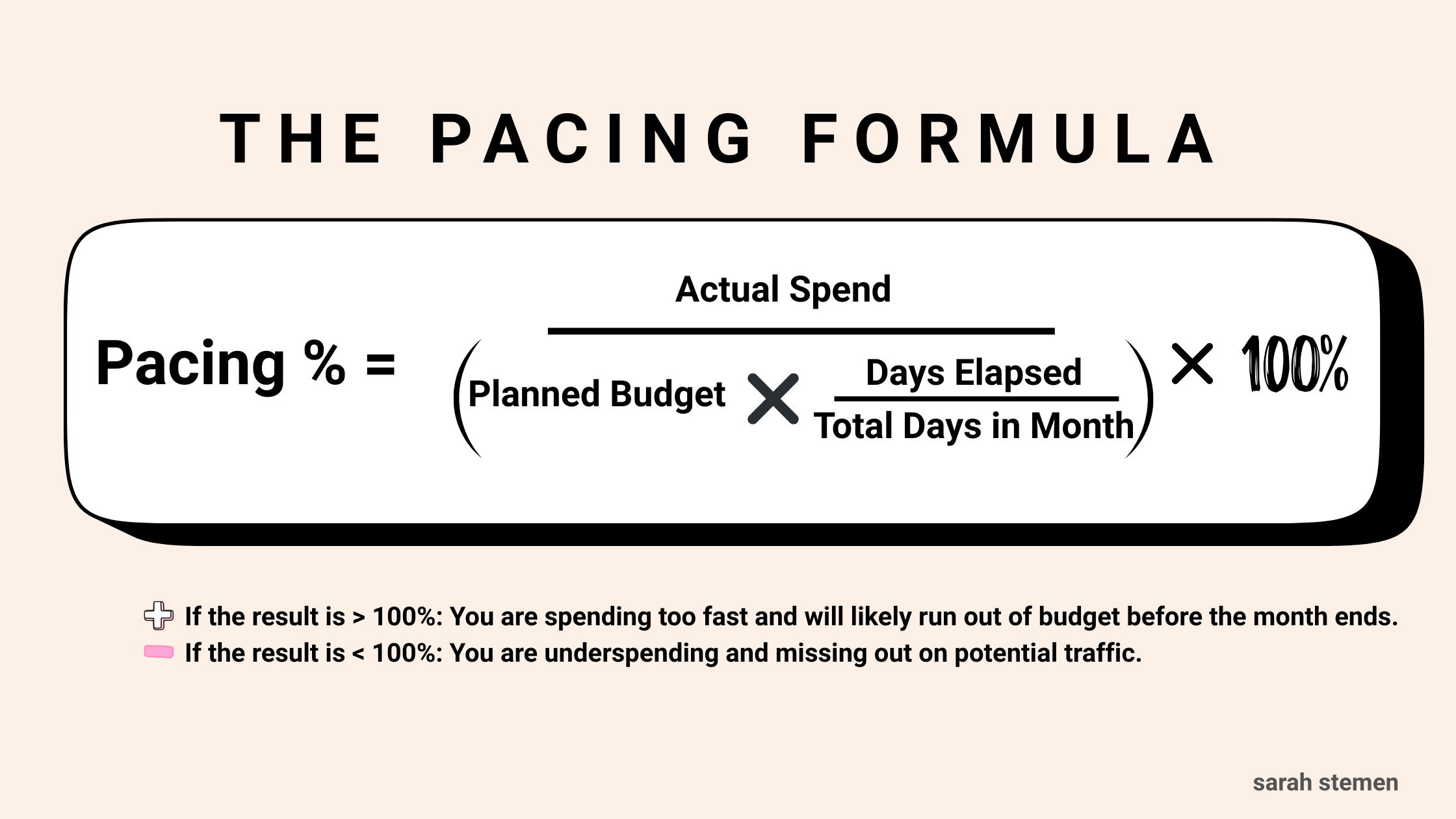
The Golden Formula: This is the exact calculation I use to determine if an account is 'running hot' or leaving opportunity on the table.
Budget Pacing vs. Bid Pacing: What’s the difference?
Think of it this way: Budget pacing is the size of your gas tank—how much total fuel you have for the trip. Bid pacing is how hard you’re hitting the accelerator. You can have a $10,000 budget, but if your bids are too low (low bid pacing), you’ll never leave the driveway.
Why is Google Ads spending more than my daily budget?
This is the #1 question I get. Google uses "overdelivery" to capitalize on days with higher search traffic. They can spend up to 2x your daily budget in a single day. While they won’t exceed your monthly cap (Daily Budget X 30.4), it can cause massive fluctuations in your daily cash flow.
How do I stop the overspend?
If you need a hard ceiling, you have two real options. First, you can use Account-Level Spend Limits for a "nuclear option" stop. Second, and more effectively, you can use automated rules within your campaign settings to pause campaigns once they hit a specific daily dollar amount.
Why is my ad active but not spending anything?
This is usually a "silent" failure. If your status is "Active" but you have zero impressions, check these three things immediately:
Bid Caps: If you’re using Target CPA or Target ROAS, your goal might be so restrictive that Google can't find a single auction to enter.
Negative Keyword Conflicts: You might have a broad negative keyword accidentally blocking your primary keywords.
Audience Size: If your remarketing list or niche targeting is too small, there simply isn't anyone to show the ad to.
What is the most likely reason a campaign fails to spend?
Nine times out of ten, it’s Ad Rank. If your Quality Score is low and your bids are conservative, you’re losing every auction before you even get a chance to spend a penny.
What exactly is a "Maximize Conversions" strategy?
This is Google’s "spend it all" button. Google Ads lets the AI bid whatever it takes to get a conversion within your daily budget. It’s great for getting data quickly, but without a Target CPA cap, it can lead to very expensive "learning phases" that eat through your budget fast.
